
Editorial guide · France
Online or in-person music lessons: which to choose?
Date:
Updated
Online music lessons remove the journey, but they do not exactly reproduce a lesson in the same room. The right choice depends on your instrument, independence and setup, rather than one format being universally better than the other.
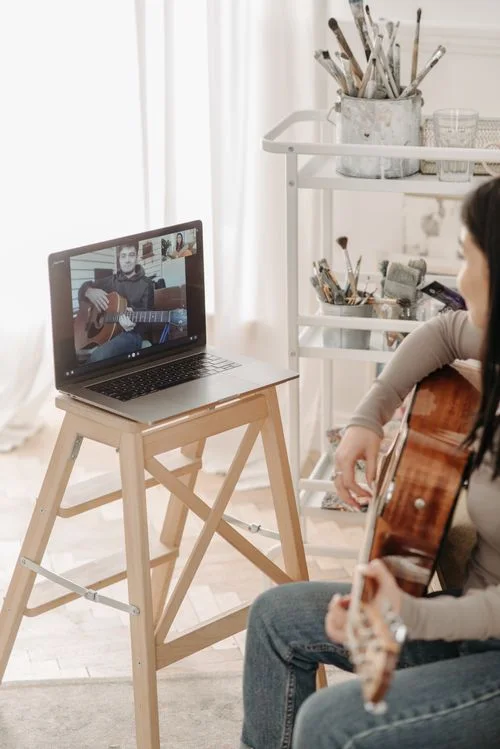
1. Check what can be seen and heard
In person, a teacher hears the instrument directly and can change viewpoint immediately. In a video call, the microphone and framing filter some information. Make sure hands, posture or face remain visible without having to twist into an awkward position.
Test the device you actually plan to use. Noise reduction intended for speech can cut sustained notes. Software settings vary: ask which options are suitable rather than following an old tutorial at random.

2. Separate taking turns from playing together
Delay on an ordinary connection makes synchronised playing between locations difficult. Online teaching can use demonstration followed by a response; an ordinary video call should not be sold as a perfectly simultaneous duet.
If ensemble playing is your priority, a local rehearsal may complement remote tuition. If you mainly want individual feedback, taking turns may be enough.
3 and 4. Compare travel and independence
Count actual travel, setup and waiting time. A lesson slot you can keep is often more useful than a theoretically ideal arrangement that becomes impossible after a few weeks.
A child or beginner may need an adult nearby to position the camera or read instructions. Check that support is available without assuming a parent can replace the teacher.
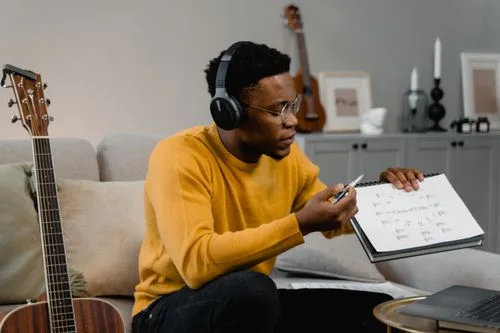
5. Decide using your actual week
Make a short checklist: a quiet space, an accessible instrument, a realistic slot and the kind of feedback you want. Then compare fees and conditions for the offers you shortlisted, without assuming online is always cheaper.
Official guidance on music audio in video calls can help you understand the technical limitation. Dr Banerjee’s lessons take place in English, live on Zoom from India; the guidance explains settings, not a guarantee of a delay-free connection.
Try the setup before comparing formats
Imagine two setups: a shared kitchen table with good connectivity and a quiet practice corner with a weak signal. Testing only the first does not tell you whether a lesson will work in the second. Make your own sound test in the intended room, in playing position, using speech followed by a few comfortable instrument sounds.
Listen for sustained notes disappearing or sound becoming distorted. Check framing without turning away from the screen. This is not a musical-level assessment or a guarantee about a future call; it identifies concrete questions about settings and setup before buying anything.
When discussing a lesson time, give your city and preferred local time rather than only saying ‘French time’. Metropolitan France changes clocks during the year; India does not follow that same change. Confirm the next appointment with a specific date and check the slot again near the clock change.
A decision sheet for a real week
On paper compare travel, setup time, instrument access, available help and the interaction you want. If playing simultaneously with other people is the priority, video-call delay matters. If seeking individual feedback, demonstration followed by a response may be a format to discuss.
Finish with constraints that recur each week rather than an ideal week. Online tuition removes a journey but still requires an appointment, place and availability. Lessons offered here are in English on Zoom from India; include that in the comparison alongside price.
In France, compare the learning settings first: a municipal conservatoire, an association music school, an independent in-person teacher and video lessons may offer different pathways. Ask whether instrument time comes with musicianship classes, ensemble practice, auditions or other commitments. An annual curriculum fee is not directly comparable with the price of an individual session.
For a local institution, check its current admissions page rather than a rule copied from an old article: accepted ages, entry level, residence requirements, possible assessments and dates can vary. An association may also charge a separate membership fee. This site’s France offer remains English-language Zoom teaching from India, not a conservatoire place or a French qualification.
Avoid asking which format is best in the abstract. Write down the problem you want to solve: a long journey, no local teacher for your subject, or a wish to play with others in the same room. For that last aim, a local meeting offers an experience video calls do not reproduce exactly. For individual feedback at a distance, check above all that sound and instructions get through. A useful comparison keeps the limitations of both options visible.
Frequently asked questions
Are lessons offered here in person?
No. Dr Banerjee teaches from India, in English and live on Zoom.
Can I move a group lesson individually?
The group follows its fixed schedule; individual lesson flexibility does not apply separately to a batch.
Why test connectivity in the lesson room?
Signal, framing and transmitted sound may change between rooms. Test in actual playing position.
Sources for your research in France
Official resource and context
Zoom music audio settings: technical guidance for preparing sound for these live Zoom lessons.
Plan your next step
A decision you can review: bring one concrete observation to the first conversation.
One free 15–30-minute one-to-one introductory session before enrolment. This is not a regular paid class or a group trial.
Instruments · About the teacher
The form prepares a WhatsApp or email draft for you to send yourself. Opening a draft does not confirm a booking.
Continue reading
Photographs illustrate the topics; they do not show students, compulsory equipment or brand endorsements.